%20--%3e%3csvg%20version='1.1'%20id='Layer_1'%20xmlns='http://www.w3.org/2000/svg'%20xmlns:xlink='http://www.w3.org/1999/xlink'%20x='0px'%20y='0px'%20viewBox='0%200%201080%201080'%20style='enable-background:new%200%200%201080%201080;'%20xml:space='preserve'%3e%3cstyle%20type='text/css'%3e%20.st0{fill:%233A6D9E;}%20.st1{fill:%23FFFFFF;}%20.st2{fill:%230F2942;}%20.st3{fill:%234A8AC2;}%20.st4{fill:%236AA8D4;}%20%3c/style%3e%3cg%3e%3cg%3e%3cg%3e%3cg%3e%3cg%3e%3cpath%20class='st0'%20d='M532.3,384.4l-27.5,14.5c-0.2,8.4-1.4,29.2-7.8,50.4l42.7-22.5c0.2-3.5,0.3-6.8,0.4-10.1%20c0.5-14,0.6-25.7,0.6-32.3H532.3z%20M589.9,406.6h-11.6c0.2,12.1,1.4,23.1,3.7,33c0.9,3.8,1.9,7.4,3.1,10.8l168.8,88.9L540,658.8%20L420.4,592l-0.9-0.5l-93.3-52.2l153.2-80.7c1.7-4,3.1-8.1,4.2-11.9c4.6-15.4,6.4-30.6,7-40.4L240,538.4L540,706l300-167.7%20L589.9,406.6z'/%3e%3c/g%3e%3c/g%3e%3cg%3e%3cg%3e%3cpath%20class='st2'%20d='M504.8,398.9c-0.2,8.4-1.4,29.2-7.8,50.4l-17.6,9.3c1.7-4,3.1-8.1,4.2-11.9c4.6-15.4,6.4-30.6,7-40.4%20L504.8,398.9z'/%3e%3c/g%3e%3c/g%3e%3c/g%3e%3cg%3e%3cg%3e%3cg%3e%3cpath%20class='st3'%20d='M793.4,583.3l-42.7,23.8l3.2,1.7L540,728.3L326.2,608.8l3.2-1.7l-42.7-23.8L240,607.9l300,167.7l300-167.7%20L793.4,583.3z'/%3e%3c/g%3e%3c/g%3e%3c/g%3e%3cg%3e%3cg%3e%3cg%3e%3cpath%20class='st4'%20d='M793.4,652.8l-42.7,23.9l3.2,1.7L540,797.9L326.2,678.4l3.2-1.7l-42.7-23.8L240,677.4l300,167.7l300-167.7%20L793.4,652.8z'/%3e%3c/g%3e%3c/g%3e%3c/g%3e%3cg%3e%3cg%3e%3cpath%20class='st2'%20d='M629.6,552.6c0,0,16.7-7.8,12.4-21c-3-9.3-42.3-12.7-63.8-63c-4-9.4-7.4-20.4-9.8-33.3%20c-2.1-11.4-3.5-24.3-3.9-39c0-1-0.1-2.1-0.1-3.1c0-1.9,0-3.9,0-5.9c0-3.1,0-6.2,0.1-9.4h31.3v-14.3l-32.3-33%20c14.1-9.3,23.4-25.3,23.4-43.5c0-28.8-23.3-52.1-52.1-52.1c-28.8,0-52.1,23.3-52.1,52.1c0,17.6,8.7,33.2,22.1,42.7l-32.4,32.4%20v15h32.4c0,0,0,1.8,0,4.9c-0.1,3.9-0.3,9.9-0.9,17.3c-1,12.5-2.9,28.9-6.9,45.5c-0.4,1.7-0.9,3.4-1.3,5.1%20c-2.5,9.3-5.6,18.4-9.6,26.9c-8.1,17.3-19.8,31.6-36.5,37.7c-33.2,12.6-22.1,31.6-11.1,36.3l-19,14.2v4.2L460,592h57.2v-26.8%20l4.9-12.6h50l7,11.8v26.9h42.1l28.6-16v-10.9L629.6,552.6z%20M543.4,291.3c2.4-10.9,10.4-18.4,17.9-16.8%20c7.4,1.7,11.5,11.9,9.1,22.8c-2.4,10.9-10.4,18.5-17.9,16.8C545,312.4,541,302.2,543.4,291.3z%20M538.2,339.5l0-0.4l0.1-1.1%20l0.8-7.2h11.1l2.1,5.3l4.4,10.8l6.9,17h-32.1L538.2,339.5z%20M518.8,531.1c11.4-11.9,16.9-47.8,19.5-81.8c0.6-7.7,1-15.3,1.4-22.5%20c0.2-3.5,0.3-6.8,0.4-10.1c0.5-14,0.6-25.7,0.6-32.3c0-3.8,0-6,0-6c-0.4-0.4,9.4,0,9.4,0c0,2.5,0.1,4.9,0.1,7.3%20c0.2,14.2,0.8,27,1.5,38.6c0.2,3,0.4,6,0.6,8.9c0.2,2.9,0.5,5.7,0.7,8.5c7.1,75,24.4,89.5,24.4,89.5H518.8z'/%3e%3c/g%3e%3c/g%3e%3cg%3e%3cpolygon%20class='st2'%20points='649.8,575.3%20619.8,591.3%20539.5,634.1%20460,592%20517.2,580.8%20517.5,580.7%20517.5,607.1%20542.5,619%20579.1,599.7%20579.1,568.6%20592.6,566%20'/%3e%3c/g%3e%3c/g%3e%3c/g%3e%3c/svg%3e)
Chess game review against your repertoire
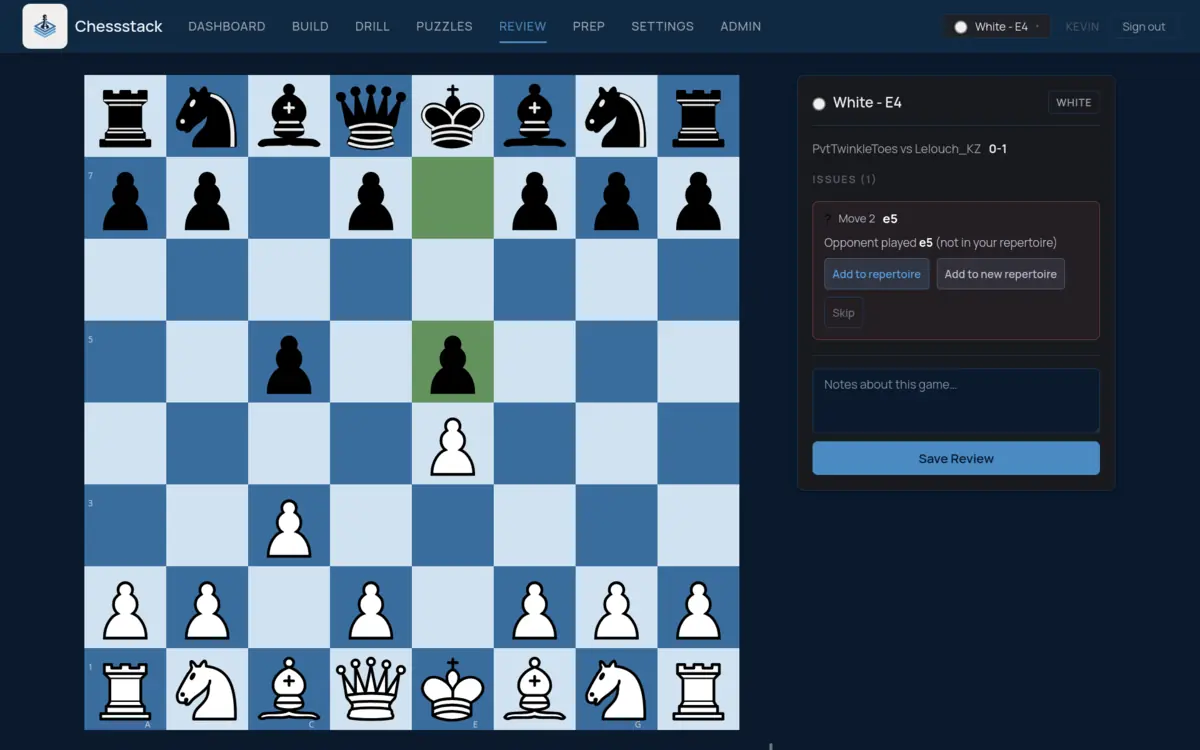
Chessstack reviews your games against your own opening repertoire. Import them from Lichess or Chess.com, or paste a PGN, and it finds the move where you or your opponent left your preparation, so you know which line to study next.
Find where you left your preparation
Each game is checked against your repertoire. If you played something other than your prepared move, Chessstack shows both and sends the move back to your drill queue. If your opponent played a move you have no answer to, pick a reply and add it to your repertoire on the spot.
Stockfish analysis of the whole game
Stockfish runs in your browser over every move and marks inaccuracies, mistakes and blunders, so you can see whether leaving book actually cost you anything.
An opening report from all your games
The Opening Report adds up all your imported games: your score in each line of your repertoire, the positions where games most often leave book, and the one move that has cost you the most, with a button to drill it or prepare a reply.
How it works
Import your games
Enter your Lichess or Chess.com username. The first import brings in the last three months of games.
Review each game
Go through the games waiting for review and decide what to do at each move that left your repertoire.
Drill the fixes
Moves you missed and replies you added go into your spaced repetition drills.
Questions
How is this different from a normal game review?
Most game review tools only compare your moves with the engine. Chessstack also compares them with the repertoire you built, so a move that is fine for the engine but not what you prepared still shows up, and you can fix it straight away.
Which games can I review?
Games from Lichess and Chess.com, imported by username, and any other game you paste as PGN, including over-the-board games.
Is game review free?
Yes. Importing and reviewing games, the Stockfish analysis and the Opening Report are all on the free plan.